Saturday, September 8, 2007

Squidoo is banned on Netscape

Recently I was trying to add a story to Netscape and got the following:
The domain or URL is banned for the following reason: Member complaints for spam farming

Here's the screenshot


Tuesday, April 3, 2007

How To Arrange 9 Gb MP3 Collection For 21 Min And 46 Sec

A brilliant idea came to my mind - to arrange my mp3 music collection. The collection means 9 Gb of MP3 tracks chaotically scattered over my Music folder and its subfolders. So, I decided to clear up this mess. I googled a bit and came over the program I need – Audio Tags Editor.


The program enables you to edit tags of audio tracks, copy, delete and rename files and folders and (what is most important) to retrieve track information from FreeDB database. Believe your or not but using this feature I discovered several artists on my hard drive I have never thought they exist :)

You are also able to rename bulk of audio files and folders. Setup Quick Rename Mask and hit Rename button. Simple and fast! In addition you can create playlists for the files you rename using specified playlist template.


I think Audio Tags Editor is indeed needful tool for every MP3 geek. I used it with pleasure and as a result, the whole collection was arranged in about 20 minutes. Go ahead and try:

Audio Tags Editor Homepage

Wednesday, March 21, 2007

VideoGet – ideal tool to download and save videos from YouTube

Yesterday I’ve found the software I was looking for since YouTube video sharing service became so popular. I was racking my brain all this time on how to save my favorite videos from YouTube and Google Video and to convert them into some AVI or MPEG files. At last, I’ve found a piece of software that does that all – VideoGet.

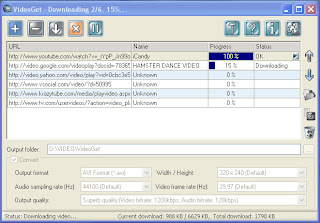
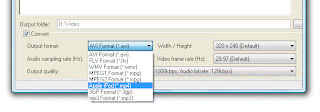
VideoGet enables you to download any video from almost all video sharing services over the web, including YouTube, Google video, Metacafe and other websites I’ve never even heard about. All what you need is to paste the URL of an appropriate video and hit the Download button. AND! Using this program you can convert all downloaded videos into any video format you like (mobile 3GP and iPod MP4 are also supported). OR you may leave FLV as is. God I like this tool!

What Else You Should Know

  • Bulk download is supported

  • Ability to save and load batch lists of videos

  • Various video conversion options

  • Full set of download manager options (Add download, Pause/Resume etc.)

  • Works on Windows Vista

  • Trial mode allows you to download up to 20 videos

Screenshots


Full version of VideoGet costs only 20 bucks. I think it’s a fair price for such brilliant piece of software and I’ve already bought 2 versions for me and my son’s PC.

Here is download and buy links:

Good Luck and Have Fun!